
Corporate secretarial module
Keep every client company's UEN, registration particulars, GST status, officers and shareholders on one record, then find any of them in seconds by name, UEN or the people behind the company. This client entity register sits at the centre of Episcript's corporate secretarial software, and AI features can be added to read a business profile and prepare the record for your staff to check.
Built in Singapore for secretarial firms, accounting practices and in-house company secretarial teams.
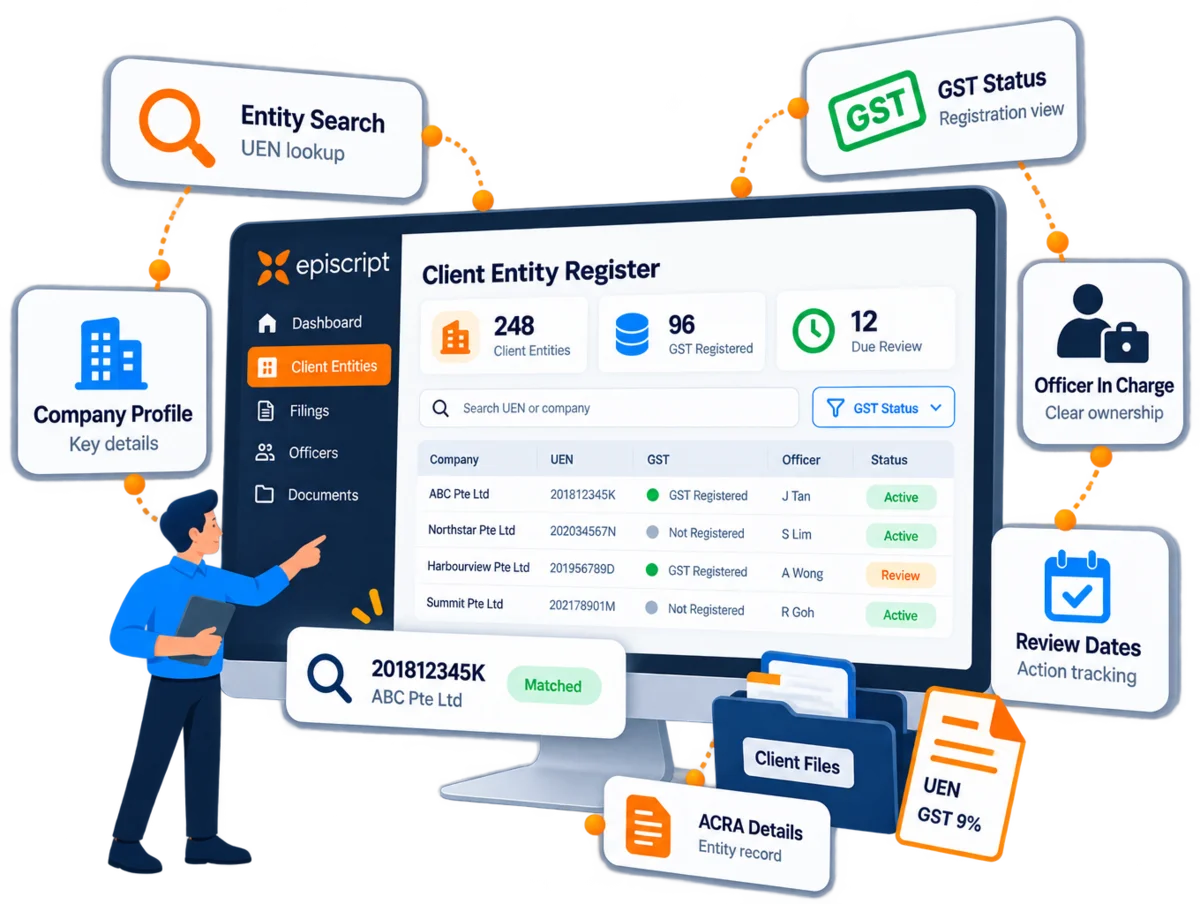
Client entity register
Each client company is taken on once and recorded once, then found, checked and updated from that same record.
Open the company record at engagement, from the UEN and the latest business profile.
Hold particulars, GST status, officers and shareholders against that one record.
Find the company by name, UEN, director or shareholder, and check what is on file.
Log each change as it happens, with the earlier details kept in the history.
Company records
Most firms keep client details in three places at once: a master spreadsheet, a folder of business profiles and whatever is typed into last year's resolutions. Each client company gets one record here instead, and everything else in the system reads from it.
Company name, UEN, entity type, incorporation date, registered address and business activities, held once per company. A UEN keyed in the wrong shape is caught at the desk, before it reaches a filing or a certificate.
Record whether each client is GST registered, its GST registration number and the date registration took effect. That number is not always the same as the UEN, which is exactly why it needs a field of its own.
Directors, company secretaries, auditors and shareholders sit against the company with their appointment dates and holdings. Search for a person and you see every client company they are connected to.
When one client company holds shares in another, the link is kept on both records. Follow the ownership up through a corporate shareholder and the whole group appears, overseas holding companies included.
Name changes, new registered addresses and other updates to particulars are logged with their dates. A client who still calls the company by its old name is found just as quickly as one who uses the new one.
The latest ACRA business profile, the constitution and the incorporation papers are filed against the company, each with the date it was obtained. Staff can see at a glance how old the copy on file really is.
Company search
A client rings about "the holding company" and nobody remembers its exact name. Type part of the name, a UEN or the director's surname, and every matching client company comes back on one screen, with its status, GST registration and the staff member in charge beside it.

ACRA and IRAS
ACRA's BizFile and the IRAS GST registered business search are the official places to check any Singapore company. Your client entity register does a different job: it holds what your firm has verified about its own clients, and when, which is what keeping client records in step with BizFile depends on.



Stop opening BizFile and the IRAS search one client at a time. Where your firm wants it, we build a check that compares your client records with ACRA's published entity data and confirms each client's GST status, then lists every company whose details no longer match for your staff to review.
It is scoped with you and built as its own phase, shaped by what each source makes available.
Capability
AI features for client company records are scoped with you and built in their own phase. Each one works with information already held in your corporate secretarial system, and your staff confirm anything it proposes before a record changes.
AI reads a newly bought business profile, lifts out the particulars, officers and shareholders, and lists every difference from the record you hold. Staff accept or reject each one.
AI compares each client record with the documents on file and flags what no longer agrees: a director who has resigned, an address that has moved, a shareholding that no longer adds up. Each finding lands as a task.
Ask for "GST registered clients with no assigned agent" and AI turns the question into a filter on your own records, with the list ready to export or act on.
Before a client call, AI summarises the company: current officers, shareholding, recent changes and anything outstanding, drawn from your own records rather than a public search.
How it fits
The client entity register is one module of Episcript's Corporate Secretarial Software, and the record every other module reads from. Correct a registered address once and the registers, the next resolution and the client's portal all show the new one.
Most firms arrive with client details spread across spreadsheets, an older system and a shared drive. We map those records to the new structure, clean them with you and run a test import for you to check before the live data goes in. Nothing is dropped without your sign-off.
Firms usually start with company records, document generation and reminders, then add registers, billing, the client portal and AI features as later phases, each with its own quote.
Weighing it up
A well kept spreadsheet, with a BizFile search whenever a detail needs checking, serves a small client book perfectly well. It starts to strain once several people edit it, the same director sits on a dozen companies and someone asks what the record said last March.
How a client entity register compares with a spreadsheet and ad hoc BizFile searches.
| Point of comparison | EpiscriptClient entity register | Typical setupSpreadsheet and BizFile searches |
|---|---|---|
| Finding a company | By current or former name, UEN, GST number, officer or shareholder | By whatever the columns hold, one tab or file at a time |
| One person across many companies | One search lists every company a director or shareholder is linked to | Found by searching each sheet in turn |
| GST registration status | Recorded per company and reportable across the client book | Accurate while someone remembers to update the column |
| History of changes | Each change logged with the user and the date | Overwritten unless someone keeps a copy |
| Registers and documents | Drawn from the same record, so they agree with it | Retyped into each document by hand |
| Who can see what | Access set by role and by client | Anyone who can open the file sees every client |
| AI features | Scoped with you and built to work with your own client data | Whatever the spreadsheet tool offers in general |
| Cost | Quoted per project and eligible for government grants | Little or nothing to start, paid for later in staff time |
Swipe to see the full table
Questions
No. ACRA's BizFile is the official search for any Singapore company and the place to buy a business profile. The client entity register holds your own client companies: the details your firm has verified, the documents behind them and every change since, searchable by name, UEN, officer or shareholder.
Corporate secretarial firms, accounting and tax practices, and in-house company secretarial teams. Anyone looking after a book of companies, Singapore and overseas, needs to find a client quickly, trust that its details are current and show where each detail came from. The register does that for every company you act for.
Yes. Officers and shareholders are held as people linked to companies, so a search on a director's or shareholder's name lists every client company they are connected to, with their role in each. Corporate shareholders work the same way, which lets you follow ownership up through a holding company.
Each company record carries its GST status, its GST registration number and the date registration took effect. You can filter the whole client book on it, for example to list every client that is not GST registered, and GST dates sit beside the secretarial deadlines with reminders before each one.
Where your firm wants it, that check is scoped with you and built as its own phase, depending on what ACRA and IRAS make available. Until then, staff file the business profile against the company and the system records the date it was obtained, so everyone can see how current the details are.
It can be added as its own phase. AI reads the business profile, lifts out the particulars, officers and shareholders, and shows each difference from the record you already hold. Your staff accept or reject every change, so nothing reaches the registers until a person has confirmed it.
Yes. We map your spreadsheets or your current database to the new structure, clean the data with you, then load company records, officers, shareholdings and document history. You check a test import before the live run, and nothing is dropped without your sign-off.
It is a module of our Corporate Secretarial Software rather than a separate product, and it is usually the first one built. Most firms start with company records, document generation and reminders, then add registers, billing, the client portal and AI features in later phases, each quoted on its own.
Access is granted by role and by client, so staff see only the companies they work on, and every edit is logged with the user and the time. Together with your own policies, those permissions and audit logs support your PDPA obligations for the personal data held on officers and shareholders.
Most firms run on the first phase within a few weeks. Scoping the record and mapping your existing data take the opening stretch, then the test import, checking and training follow. The number of modules and the depth of customisation set the pace, and we agree the schedule before work starts.
Yes. Our solutions are eligible for government grants. The Enterprise Development Grant supports project costs including software, and we will explain how your project fits and prepare the documents an assessor expects to see.
Related builds
The full system: registers, documents, filings, deadlines, billing and the client portal.
Read more Corporate compliance softwareWider compliance programmes, policies and obligations, tracked beyond the statutory filings.
Read more Project management softwareIncorporation, strike-off and annual filing jobs, with tasks and deadlines assigned across the team.
Read more Custom CRM softwareA fuller pipeline for firms winning new corporate clients, with scoring, assignment and campaign tracking.
Read moreNext step
Secretarial firms rarely lose a client company. They lose the half hour it takes to confirm which version of its details is current, and the director whose other three companies nobody thought to check. Book a demo and we will load a few of your client companies and search them with you.