Procurement Software and Purchasing Systems for Singapore Businesses

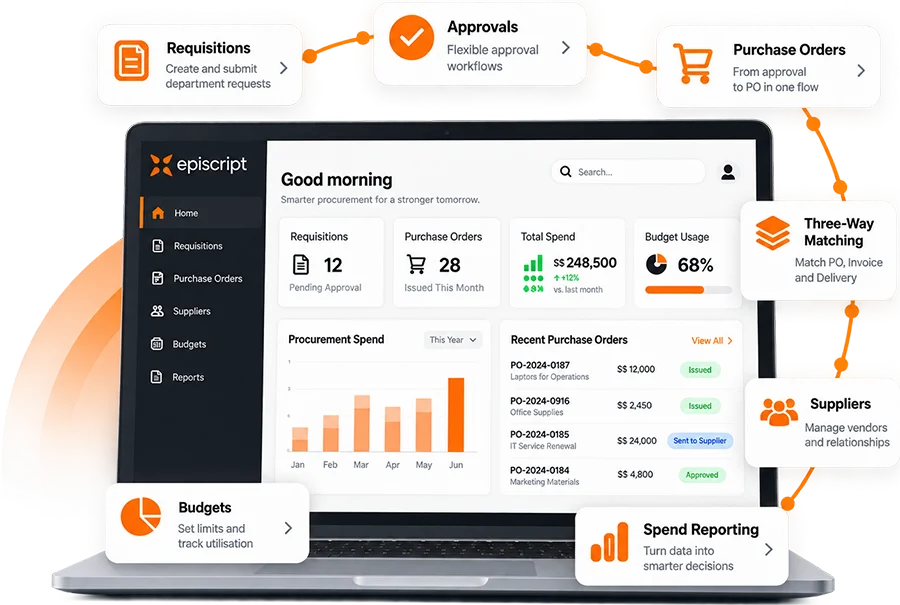
Episcript builds custom procurement software that runs purchasing the way your business already works. Requisitions, approvals, purchase orders, supplier records, contracts and budgets belong to one system, and a complete audit trail records who did what and when.

Modular AI features can be added at your own pace, from reading a supplier invoice to suggesting the next reorder point.

Every purchase request follows your approval matrix, not a vendor's idea of one.

Purchase requisitions, approvals, purchase orders and supplier records joined up inside an Episcript purchasing system
  • Built and supported in Singapore
  • Approval rules taken from your own purchasing policy
  • Connects to your accounting, ERP and stock systems
  • AI features scoped with you, built in their own phase
  • Speak to the team on 6581 3431
One Purchasing System

Procurement Software Shaped Around Your Own Purchasing Process

A custom purchasing system records a purchase the way your team already raises it, approves it and receives it.

Requisitions carry your cost centres, projects and item categories. Approval routes follow the value bands and departments written into your purchasing policy. Once an order is approved, the purchase order reaches the supplier with your own numbering and terms, and the receiving record closes the loop against it.

Buyers, approvers, receiving staff and finance work from the same records, and the audit trail is created automatically as each person works. Where purchasing forms part of a wider operation, the same modules can sit inside a custom ERP system alongside sales, stock and accounts.

Operational Outcomes

Purchasing Outcomes Across the Team

  • Staff raise requisitions on a phone or a laptop, and approvers act on them the same day
  • Approval routes follow value bands, departments and delegated authority
  • Purchase orders carry your numbering, terms, currency and supplier codes
  • Three-way matching checks the supplier invoice against the order and the goods receipt before payment is released
  • Budget balances fall as commitments are raised, rather than at month end
  • Spend by supplier, category and cost centre is reportable at any hour
  • AI can read a supplier invoice and prepare the match before payment is approved

The Procure to Pay Process, From Requisition to Payment

A purchase moves through the same stages every time, and each stage works from the same underlying purchasing record. That is what removes the re-keying between the buyer, the store and finance.

  1. 01

    Requisition

    A buyer raises the request against a cost centre, a project or a budget line.

  2. 02

    Approval

    The request routes to the approvers your policy names for that value and department.

  3. 03

    Purchase Order

    An approved request becomes a purchase order and reaches the supplier by email.

  4. 04

    Goods Receipt

    Receiving staff record what arrived, in full or in part, against the open order.

  5. 05

    Invoice Matching

    Three-way matching checks the invoice against the order and the receipt before finance approves it.

  6. 06

    Payment and Reporting

    Finance releases payment, and the spend lands in the budget and supplier reports.

Core Modules

Core Purchasing, Supplier and Approval Management Features

Key capabilities run from purchase order software through to supplier, contract and budget control. Each module is built to your own rules rather than switched on from a template.

Linked supply chain symbol standing for purchase order tracking from issue to delivery

Purchase Order Management

Raise, issue and track purchase orders for goods, services and contracted work. Order revisions, part deliveries and cancellations stay on the same record, and live status tells buyers exactly where each order stands.

Supplier network symbol representing a central register of vendors and their documents

Supplier Management

Hold every supplier in one register with contacts, UEN, GST status, bank details, certificates and expiry dates. Score delivery, price and quality as orders close, then draw on that history when the next award is decided.

Signed and approved document symbol for a purchase requisition cleared for ordering

Requisitioning

Staff raise purchase requests against a cost centre or project, using catalogue items or free text lines. Approved requisitions convert straight into purchase orders and carry their approval history with them.
Stamped supplier contract symbol for agreements held with their renewal dates

Contract Management

Store supplier contracts, rate cards and service agreements with their values, start dates and notice periods. Renewal alerts reach the contract owner in time to renegotiate, instead of a rate rolling over by default.

Budget symbol representing committed spend measured against a departmental allocation

Budget Control

Match every requisition to the budget it draws on before anyone approves it. Commitments reduce the available balance immediately, and the approver sees the remaining figure on screen at the moment of the decision.

Approval tick symbol for a multi tier authorisation route inside the purchasing system

Automated Approval Workflows

Build multi-tier approval rules by value, department, category and project. Delegation covers leave and travel, reminders chase approvals that sit too long, and each decision records the approver, the amount and the time.

Spend Visibility

Spend Reporting, Inventory Levels and User Permissions

Procurement reporting draws on live order, receipt and invoice records rather than a spreadsheet rebuilt every month. Filter spend by supplier, category, cost centre, project or period, then export the figures finance actually needs.

The purchasing system can also share data with your invoicing and payment management system, keeping finance records consistent at month end.

Financial report symbol for spend analysed by supplier and category

Spending Reports

See where the money went, by supplier, category, department and period. Compare one quarter with the last, expose repeat buying that belongs on a contract, and identify the suppliers worth renegotiating with before the next cycle.
Management report symbol for procurement performance measured across the year

Detailed Management Reporting

Report on supplier performance, approval turnaround, order cycle times and the procurement measures your management team follows. Reports are written to your definitions and can be scheduled to arrive by email each week or month.

Warehouse symbol for stock levels tracked by location and reorder point

Inventory Management

Track stock by location, set reorder points, and raise a replenishment requisition the moment a level is breached. Stock updates automatically from each goods receipt, removing the need to update a second spreadsheet.

Team planning symbol for procurement roles mapped to system permissions

Roles and Responsibilities

Role-based permissions give each role the access it needs and nothing beyond it. Buyers, approvers, receiving staff and finance open their own screens, and the activity log records who changed a supplier, an order or an approval limit, which supports your PDPA obligations.

AI Features That Can Be Built Into Your Procurement Software

AI features for procurement software in Singapore are scoped with you and built in their own phase. They work with information already held in your purchasing system, and your staff review every draft before it is approved.

Supplier Invoice Reading

AI reads a supplier invoice or delivery order, pulls out the line items, and prepares the three-way matching against the purchase order and the goods receipt before an approver signs.

Requisition Drafting

AI drafts a requisition from previous purchases of the same item, filling in the supplier, the last unit price and the usual lead time for the buyer to check.

Quotation Comparison

AI reads the quotations returned against a request, lines up price, lead time and terms side by side, and flags what differs beyond the headline figure.

Spend Classification

AI sorts spend into your own categories, then flags duplicate invoices, orders split to dodge an approval limit, and purchases that belong under a contract you already hold.

Reorder Forecasting

AI reads purchase history, consumption and supplier lead times, suggests reorder points, and names the items likely to run short in the coming month.

Contract Review and Renewal Alerts

AI reads stored contracts, extracts renewal dates, notice periods and price escalation clauses, then raises a reminder against the contract owner well before the deadline.

Module Reference

Procurement Modules for Purchasing, Suppliers and Budget Control

The modules below can be included in your build. Treat the list as a starting point for scoping rather than a fixed package, and leave out anything your team will not use.

Purchasing and Requisitioning

  • Purchasing of all item types, from stock goods to services and contracted work
  • Automatic purchase request initiation from stock levels or a set schedule
  • Automatic triggers that generate purchase orders from approved requests
  • Bid management and vendor analysis on every tender or quotation exercise
  • Order revisions and cancellations tracked against the original purchase order
  • Approval control that holds the whole process inside the agreed budget

Supplier Records and Compliance

  • Complete supplier records with related documents uploaded against each one
  • Identification, assessment and qualification of new suppliers
  • Pre-qualification, qualification and re-qualification run as standard steps
  • Automatic categorisation by service type, product, country, region or delivery speed
  • Direct communication with suppliers by email or automated SMS
  • Live reporting on supplier activity and transactions
  • Alerts when something changes that affects a supplier relationship

Budget and Financial Control

  • Several budget types held and managed in the same system
  • Spending matched automatically to the budget it belongs to
  • Integration with your finance system so both sets of figures agree
  • Custom budget approval rules by value, department or project
  • Live visibility of budget, committed spend and remaining balance
  • Controls that stop a budget being overridden without authority

Integrations for Accounting, Payments and Supplier Communication

Your finance and operations tools stay where they are. We wire the purchasing system into them rather than asking you to replace anything.

  • Xero
  • Existing ERP and accounting systems
  • InvoiceNow and Peppol connectivity
  • Stock and warehouse systems
  • Email and SMS gateways
  • WhatsApp Business
  • PayNow and GIRO
  • Banking and card payment workflows

Where procurement and supplier invoicing form part of the same workflow, the system can be integrated with an InvoiceNow-ready finance solution or a Peppol service provider. The GST InvoiceNow requirement is being phased in and reaches all GST-registered businesses by 2031, so the connection is worth scoping early. Tell us what your finance team runs today and we will scope the rest.

Why Custom

Custom Procurement Software vs Off-the-Shelf Procurement Software

Both approaches can work well. The right choice depends on how closely standard software fits your purchasing process, integrations and approval requirements.

Custom procurement software from Episcript compared with a typical off-the-shelf purchasing product
Point of Comparison EpiscriptCustom Build Typical ProductOff the Shelf
Approval routing Built to your value bands, departments, delegated authority and agreed exceptions Configured within the approval and workflow options the product supports
Purchase order and requisition forms Your fields, numbering, terms and document layouts, built around your process Usually based on standard templates with configurable fields and layouts
Fit with systems you already run Integrations developed around the ERP, accounting and stock systems you use today Usually connects through supported connectors, APIs and the vendor's integration framework
Ready-made functionality on day one Requires design and development, usually delivered in phases Typically faster where your requirements fit existing product functionality
Changes after go-live The system can be extended or reshaped as your policy and processes change Changes depend on the configuration, extension and customisation options the product provides
AI features AI functions can be scoped around your own purchasing work and introduced in a later phase AI functionality depends on the features and roadmap offered by the product vendor
Reporting Reports built around your own definitions, workflows and data requirements Reporting works within the product's data model, report builder and customisation options
Cost shape Project development cost followed by an agreed hosting and support arrangement Typically licence or subscription pricing based on users, modules, transactions or another vendor pricing model

Swipe the table sideways to read both columns.

Implementation, Data Migration and Phased Rollout

Most procurement builds run in phases. The first release usually covers requisitions, approvals and purchase orders, because that is where the manual chasing sits. Receiving, invoice matching, contracts and reporting follow once buyers are working comfortably in the system.

Your supplier master, item catalogue, contracts and open orders are imported before go-live. We run the old process alongside the new one until finance is satisfied that both sets of numbers agree.

How a Build Runs
  1. 1

    Process Review

    We map your current purchase flow, approval limits and document templates with the people who use them every day.

  2. 2

    Design and Prototype

    You review the screens and the approval matrix, and sign them off before development begins.

  3. 3

    Build and Integration

    We build the modules in scope and connect the accounting, ERP, stock and messaging systems they depend on.

  4. 4

    Data Migration

    Suppliers, item catalogues, contracts and open purchase orders are imported, then checked line by line against your records.

  5. 5

    Training and Phased Go-Live

    Buyers, approvers, receiving staff and finance train on their own screens, and later phases follow the plan agreed with you.

Procurement Software FAQs for Singapore Buyers

Procurement software manages the full purchase cycle in one place: requisitions, approvals, purchase orders, supplier records, goods receipts, contracts, budgets, invoice matching and spend reporting. Instead of purchase requests moving by email and spreadsheet, every step is recorded against the same purchase, so buyers, approvers and finance work from one set of figures.

Purchase order software mainly handles the creation, approval and tracking of purchase orders. Procurement software covers the wider procure-to-pay process around them: requisitions, quotations, supplier records, contracts, budget checks, goods receipts, three-way matching and spend reporting. Many businesses start with purchase order management and extend into the rest later.

A custom build suits you when your workflows, approval matrix, item categories or supplier rules do not fit a packaged product, or when purchasing must connect closely to systems you already run. Off-the-shelf products are usually faster to deploy where requirements match. A custom system is shaped around your process and changes when that process changes.

Cost follows scope rather than a price list: the number of modules, the complexity of your approval rules, the integrations required, the volume of data to migrate and the range of user roles. A phased build spreads the investment, because the first release can cover requisitions, approvals and purchase orders while later phases add the rest.

Timelines depend on scope, and most clients begin with a first phase covering requisitions, approvals and purchase orders. Supplier records, item catalogues, contracts and open orders are imported from your spreadsheets or your current system, reconciled against your own figures, then verified by your team before go-live. Later phases follow an agreed plan.

Yes. Purchase orders, supplier invoices and payment records can be shared with Xero or with the accounting and ERP systems you already run, which removes the second keying of the same invoice. Stock and warehouse systems, email and SMS gateways and WhatsApp Business can also be included in the scope.

Yes. Approval rules come straight from your purchasing policy, using value bands, departments, cost centres, item categories and projects. Delegation covers leave and travel, reminders chase approvals that sit too long, and every decision records the approver, the date and the amount authorised.

Yes. Three-way matching checks the supplier invoice against the purchase order and the goods receipt before payment is approved, so quantities and prices are confirmed rather than assumed. Matching tolerances, part deliveries and the handling of exceptions are defined during scoping and built to the rules your finance team already applies.

Yes. Supplier records hold the UEN and GST registration status, and purchase orders and invoices carry GST at the rate you set. Where supplier invoicing forms part of the same workflow, the system can be integrated with an InvoiceNow-ready finance solution or a Peppol service provider, which helps you prepare for the phased GST InvoiceNow requirements.

Yes, a supplier portal can be built as part of the scope. Suppliers sign in to view awarded orders, quote against an open request, upload invoices and delivery documents, and keep their own contacts and certificates current. Everything they submit is logged against their supplier record for your buyers to review.

Yes. The system can hold separate entities, branches or warehouses, each with its own budgets, approval limits and purchase order numbering, while management reporting consolidates across all of them. Multi-currency purchasing suits regional suppliers, and the exchange rate treatment is agreed with your finance team during scoping.

Potentially. The Productivity Solutions Grant generally supports pre-approved solutions, so a fully custom build may not fit that route. The Enterprise Development Grant can support qualifying transformation and automation projects, including the development of sophisticated software. Eligibility is assessed by the agency on the company and the project, so approval cannot be guaranteed. We can supply the scope and technical detail an application needs.

Next Step

Book a Demonstration of the Procurement System

Bring your current purchase form, your approval limits and one awkward supplier arrangement. We will show you how the procurement software handles all three, and what a first phase would cover for your business.